
SSO ID Registration Rajasthan — How to Create a New Account
Creating an SSO ID is completely free for all citizens, businesses, and government employees of Rajasthan. A single digital identity grants lifetime access to state scholarships, recruitment exams, utility bill payments, and healthcare schemes.
https://sso.rajasthan.gov.in/register
Why Creating an SSO ID is Essential for Rajasthan Residents
The Rajasthan Single Sign-On (RajSSO) system is far more than a simple recruitment login portal; it is the official digital identity required to interface with state administration, welfare schemes, higher education admissions, and public utility infrastructures. Once generated, your SSOID serves as your permanent electronic dossier throughout your lifetime in Rajasthan.
State Recruitment & One-Time Registration (OTR)
All competitive exam notifications published by the Rajasthan Public Service Commission (RPSC) and the Rajasthan Staff Selection Board (RSSB) require candidate submission via RajSSO. Through your SSOID, you complete the mandatory One-Time Registration (OTR), pay the single lifetime recruitment fee, and generate admit cards for exams including RAS, REET, Patwari, Police Constable, and Junior Accountant.
Direct Benefit Transfer (DBT) & Social Welfare
RajSSO directly connects to your Jan Aadhaar family record. This enables automatic disbursal of student scholarships (Social Justice and Empowerment department), Mukhyamantri Ayushman Arogya health insurance claims, agricultural equipment subsidies, old-age pensions, and domestic LPG gas cylinder subsidies directly to your verified bank account.
Digital Certificates & Revenue Records
Eliminating physical visits to tehsil offices, your SSO profile allows you to apply for, track, and download legally valid digitally signed certificates: Bonafide / Domicile Certificates, Caste Certificates (SC, ST, OBC, MBC, EWS), Income Certificates, and digitized land ownership records (Apna Khata / Jamabandi नकल).
Utility Services & Municipal Payments
Through the integrated e-Mitra citizen portal, you can make instant cashless payments for electricity bills (JVVNL, AVVNL, JdVVNL), water utility charges (PHED), property tax, traffic challans, and commercial municipal licenses with instant verifiable receipts.
Select Your Verified Registration Pathway
Choose the category that matches your legal status to ensure full access to relevant government modules.
Jan Aadhaar or Google
For individual residents and job applicants. Domicile holders must link their Jan Aadhaar to enable state quotas, fee concessions, and student scholarships.
Business Registration (BRN)
For proprietors, partnerships, LLPs, and industrial units. Provides access to single-window clearances, labor licenses, factory inspections, and state tenders.
SIPF Employee Number
For state government employees and civil servants. Unlocks RajKaj e-Office files, electronic salary pay slips via PayManager, and GPF ledgers.
Jan Aadhaar vs Google Authentication: Avoiding the Duplicate ID Trap
The single most common pitfall encountered by Rajasthan students and job aspirants is registering their initial SSO ID via the "Google" button. While clicking "Google" appears fast and convenient, it creates a decoupled identity that lacks verification from the State Resident Data Hub (SRDH).
Why Rajasthan Residents Must NEVER Register Initially with Google
When you register via Google, the portal creates an unverified account. Months later, when you attempt to submit an RPSC recruitment form or apply for a Post-Matric scholarship, the application portal mandates linking your 10-digit Jan Aadhaar card to prove state domicile and category benefits. However, if any family member or previous e-Mitra transaction already mapped your Jan Aadhaar to an earlier account, the portal throws the catastrophic error: "Jan Aadhaar ID already associated with another SSOID".
Resolving this requires an extensive duplicate account merger process or submitting physical affidavits at the DoIT&C state headquarters in Jaipur. To prevent this nightmare, always select 'Jan Aadhaar' as your authentication provider from day one.
When is Google Registration Appropriate?
The Google registration pathway is explicitly engineered for candidates residing outside Rajasthan (e.g., Uttar Pradesh, Haryana, Delhi, Bihar, Punjab) who are applying for open-merit all-India vacancies in RPSC or RSSB recruitment. Non-Rajasthan candidates do not possess a Jan Aadhaar card and are eligible for General/Unreserved category quotas exclusively.
Step-by-Step Online Registration Walkthrough
Follow these sequential steps to set up your lifetime digital SSO ID on the official government portal.
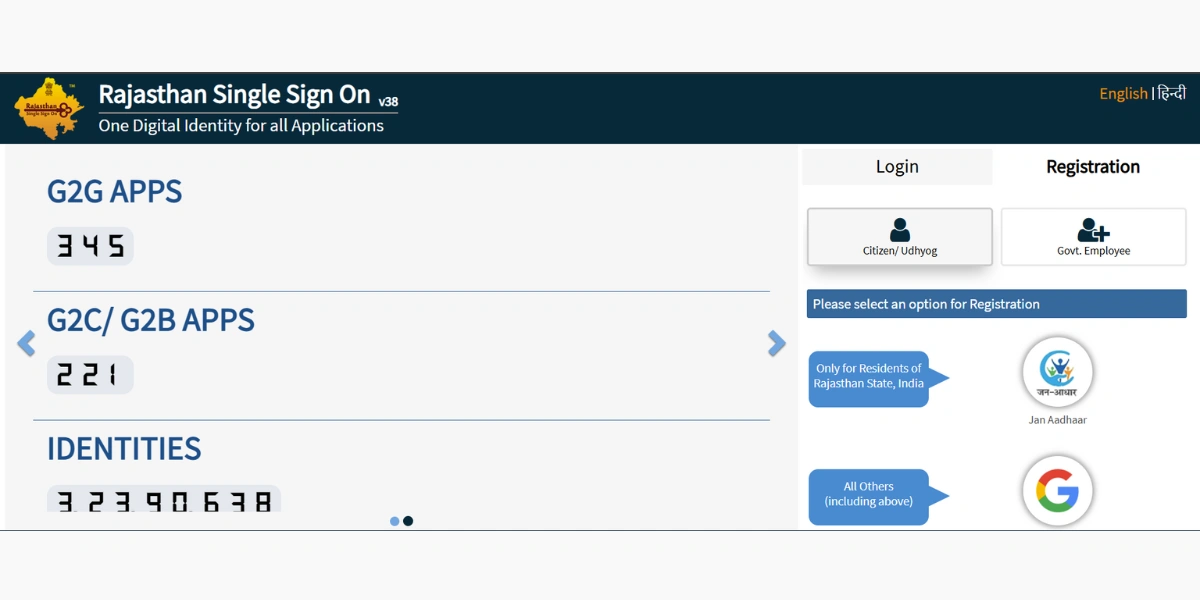
Prerequisites Checklist Before You Start
- Rajasthan Residents: Jan Aadhaar Card (mandatory for state subsidies & job quotas)
- Non-Rajasthan Residents: Valid Google Account (@gmail.com)
- Active mobile number linked to Jan Aadhaar / Aadhaar for OTP verification
- For Businesses: 16-digit Business Registration Number (BRN) or Udyog Aadhaar
- For Govt Employees: SIPF Employee Number and state-registered mobile number
Open the Official State Registration Gateway
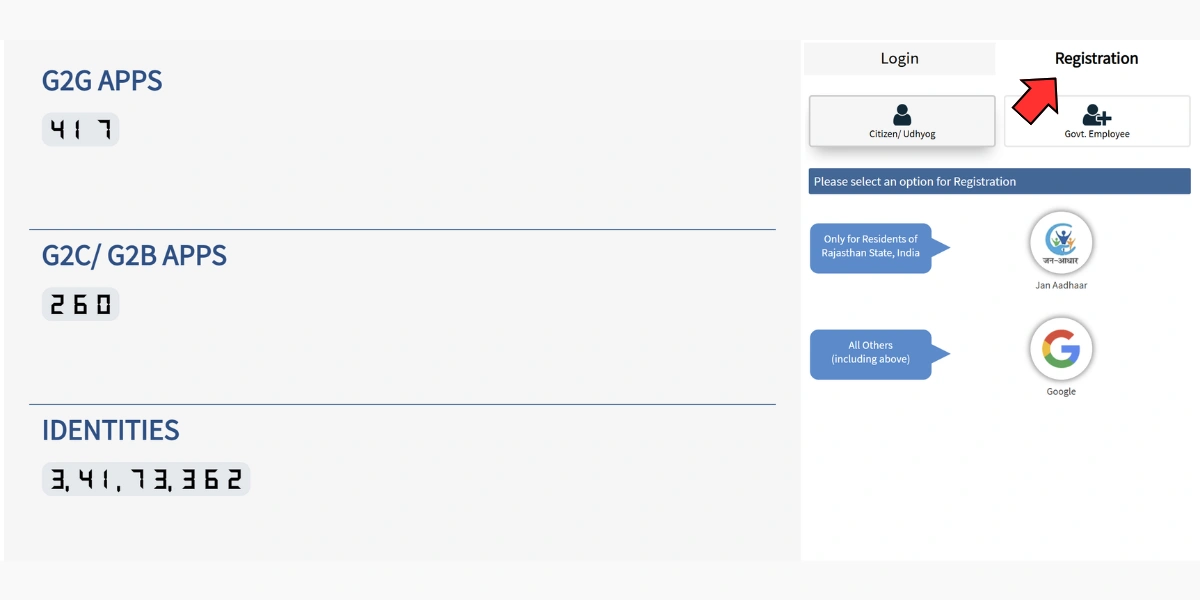
Visit https://sso.rajasthan.gov.in/register directly in your browser. Look for the three primary category registration tabs on the screen: Citizen (नागरिक), Udhyog (उद्योग), and Govt. Employee (सरकारी कर्मचारी).
Select Your Registration Category
Choose 'Citizen' if you are an individual applying for government schemes, recruitment exams, or welfare programs. Choose 'Udhyog' if you represent a proprietary firm, partnership, or corporate entity. Choose 'Govt. Employee' if you are a state civil servant.
Select Digital Identity Provider (Jan Aadhaar vs Google)
For Rajasthan residents, select 'Jan Aadhaar'. Enter your 10-digit Jan Aadhaar Family ID or 16-digit Enrolment Receipt Number. If you reside outside Rajasthan, select 'Google' to authenticate with your Gmail credentials.
Select Family Member & Authenticate Mobile OTP
If registering via Jan Aadhaar, the system retrieves all family members enrolled on the card. Select your individual name radio button. Click 'Send OTP'. Enter the 6-digit one-time password dispatched to the mobile number registered with your Jan Aadhaar profile.
Choose Your Unique SSO Username & Set Password
The system suggests an available SSOID username (e.g., your name followed by digits). You can customize it; an active green checkmark confirms availability. Create a strong password (minimum 8 characters with at least one uppercase letter, one lowercase letter, one number, and one special character like @, #, or $).
Submit Registration & Receive SMS Confirmation
Click the 'Register' button. The portal generates your lifetime Rajasthan Single Sign-On digital identity and immediately dispatches a confirmation SMS containing your SSOID to your registered phone. You can now proceed to login immediately.
Ready to complete this step?
Proceed to the official state portal to enter your data safely.
Understanding the Citizen Digital Onboarding Interface
Review the interface layout before proceeding to ensure you enter verified identification numbers.
Mandatory Post-Registration Profile Completion Checklist
Generating your username is merely phase one of onboarding. To unlock government recruitment forms, subsidy claims, and utility applications, you must finalize your profile metadata. Immediately after your initial login, complete these four mandatory linkage items:
1. Link and Biometrically Verify Your 12-Digit UIDAI Aadhaar
Click the pencil icon beside your name on the dashboard header. In the Aadhaar field, type your 12-digit number and click the biometric / OTP verify button. This permanently confirms your identity and prevents malicious impersonation.
2. Seed Your Primary Active Mobile Number & Recovery Email
Ensure your active 10-digit mobile number is verified with an SMS OTP. Input a secure, permanent personal email address (e.g., personal Gmail). This guarantees you can reset your password even if you misplace your SIM card.
3. Synchronize Bank Account for Direct Benefit Transfers (DBT)
For students applying for higher education scholarships or citizens eligible for utility refunds, enter your active bank account number and IFSC code. The portal verifies your name against the bank ledger to prevent transaction failures.
4. Upload a Compliant Passport Photograph & Signature
Upload a clear passport photograph (JPEG format, 50 KB – 100 KB) and digital signature (20 KB – 50 KB). This photo automatically seeds into RPSC admit cards and e-Mitra certificates, saving hours during future online submissions.
Jan Aadhaar Family Structure & Marksheet Data Alignment
The State Resident Data Hub (SRDH) structures Jan Aadhaar cards around a designated female head of household (मुखिया) with affiliated family members (सदस्य) listed underneath. When registering an individual SSO ID, understand how this hierarchy interacts with state identity systems:
Individual Identity Sovereignty Under One Family Card
Every adult family member listed on a Jan Aadhaar card is entitled to create their own distinct, password-protected SSO ID. The portal does not restrict families to a single communal account. However, when selecting your name from the family roster, ensure your individual 12-digit UIDAI Aadhaar number is properly seeded against your member profile rather than the parent's record.
The Golden Rule: Match Jan Aadhaar Exactly to 10th Board Marksheets
Before initiating SSO registration for competitive recruitment (RPSC/RSSB), inspect the spelling of your name, your father's name, and your date of birth in your Jan Aadhaar card. State examination software pulls these demographic attributes directly from Jan Aadhaar to populate your One-Time Registration (OTR). If your mark sheet reads "Suresh Kumar" while Jan Aadhaar reads "Suresh", exam document verification boards may disqualify your candidature. Correct discrepancies at an e-Mitra kiosk prior to registration.
Special Category Quotas: Automatic Concessions via SSO Profile
Rajasthan's unified digital platform automatically maps statutory affirmative action benefits to verified candidate profiles. By ensuring your certificates are uploaded during or immediately after registration, you unlock automated fee waivers and age relaxations:
Digital Caste Certificates
Link your digital caste certificate token issued by revenue tehsildars. The portal verifies validity dates and auto-qualifies candidates for fee concessions.
UDID Card Integration
Candidates with 40% or higher permanent benchmark disability can input their Unique Disability ID (UDID) to claim 100% exam fee exemptions and scribe assistance.
Defense Discharge Book
Ex-servicemen entering their PPO and military discharge book numbers receive statutory age relaxations and dedicated state service reservation quotas.
Common Registration Obstacles & Official Solutions
Solutions for duplicate account blocks, mobile OTP delays, and business registration validation issues.
Jan Aadhaar / Aadhaar Already Linked to Another SSO ID
This indicates you or a family member previously created an SSO account using this Aadhaar or Jan Aadhaar number. Do not create another account. Use the 'Forgot SSOID' tool with your Jan Aadhaar number to retrieve your original username, or follow our account merge protocol.
OTP Not Received on Registered Mobile Number
The OTP is dispatched to the mobile number seeded in your Jan Aadhaar card, not necessarily your current primary SIM. Verify which mobile number is mapped to your name in your Jan Aadhaar card at an e-Mitra kiosk or via the Jan Aadhaar citizen app.
SSOID Username is Already Taken
SSO usernames are unique across the entire state database. If your preferred name is taken, append your birth year, district code, or initials (e.g., rahul_jaipur98) until the system shows a green checkmark indicating availability.
Business Registration Number (BRN) Validation Error
For Udhyog registrations, ensure your 16-digit BRN is actively verified on the Rajasthan Business Register portal (raxbp.rajasthan.gov.in). Inactive or newly applied BRNs may take 24–48 hours to synchronize with SSO.
Government Employee SIPF Details Not Found
Ensure your DDO (Drawing and Disbursing Officer) has entered your employee master data in the State Insurance and Provident Fund (SIPF) portal. If recently appointed, contact your department nodal officer for SIPF profile activation.
Government Contact Directory
Toll-free across Rajasthan (Free call)
Alt: 0141-2925554
Dial 181 for service complaints
Registration Questions & Answers
Answers about eligibility, domicile rules, document requirements, and account troubleshooting.