
Forgot SSO ID or Password — Complete Recovery Protocols
If you cannot sign in because you forgot your SSO username or misplaced your password, do not register a new account. Use the official SMS recovery service or the portal's online self-service recovery options.
Fastest Method: 10-Second SMS Recovery
If you have your registered mobile number active, send this SMS text directly from your phone to retrieve your SSOID immediately:
Why You Must Recover Your Account Instead of Creating a New SSO ID
When citizens forget their SSOID or password, an instinctive reaction is to open the registration page and attempt to create a brand-new account. Under Rajasthan state IT architecture, this is the worst possible course of action. Because your 12-digit Aadhaar and 10-digit Jan Aadhaar numbers are permanently bound to your initial SSOID in the State Resident Data Hub (SRDH), attempting to register a second account causes irreversible credential conflicts.
Recruitment Form Rejection Risks
The Rajasthan Public Service Commission (RPSC) and Staff Selection Board (RSSB) run automated integrity scans prior to publishing exam admit cards. If a candidate is flagged with multiple active SSOIDs sharing the same biometric Aadhaar, candidate registration can be placed on hold or rejected for duplicate identity misrepresentation.
Loss of Historical Application Data
Your original SSO ID contains your lifetime One-Time Registration (OTR) fee receipt, previously issued Bonafide and Caste certificates, e-Mitra transaction ledgers, and scholarship disbursement histories. Creating a new account starts with a blank record and forfeits access to past documents.
OTR Single Lifetime Fee Protection
Under Rajasthan's One-Time Registration policy, citizens pay a single recruitment fee (₹600 General, ₹400 Reserved) once in their lifetime. If you abandon your old SSOID, you cannot transfer your OTR receipt to a new account without submitting complex manual affidavits at the state directorate.
Instant 100% Free Self-Service Recovery
The Government of Rajasthan has engineered automated self-service recovery channels that take less than 60 seconds to retrieve your username via SMS or reset your secret password via Jan Aadhaar OTP. Account recovery is instantaneous and completely free.
Recovery Options (Username & Password)
Select between instant SMS syntax or the online Jan Aadhaar OTP self-service portal.
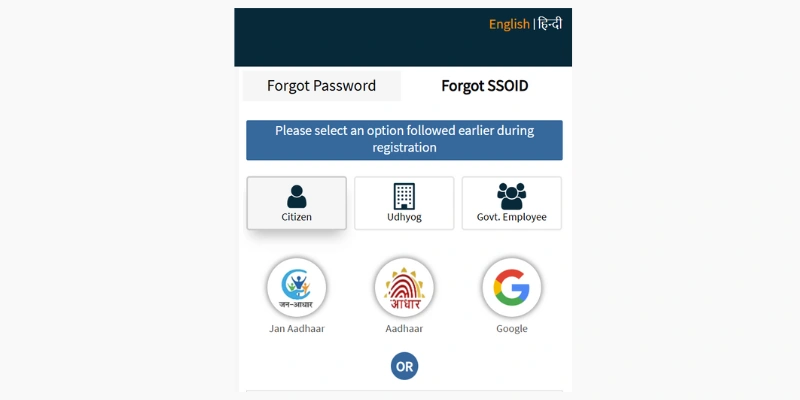
Prerequisites Checklist Before You Start
- Registered mobile number active to receive SMS and OTPs
- Jan Aadhaar Card Number (10 digits) or Aadhaar Number (12 digits)
- Access to registered email address (if utilizing email reset link)
- Registered SIM card inserted in phone (if utilizing 10-second SMS recovery)
Fastest Method: Retrieve SSOID via 10-Second SMS
Open your mobile phone's SMS application. Create a new message: type RJ SSO (with a single space) and send it to 9223166166. Within 10 to 30 seconds, the Rajasthan state server replies with your exact registered SSOID username.
Online Method: Open the Official Recovery Gateway
If you prefer an online web interface, navigate to https://sso.rajasthan.gov.in/signin. Locate the two self-service recovery links situated directly beneath the login credentials box: 'I Forgot my SSOID' and 'I Forgot my Password'.
Select Your Recovery Identifier (Jan Aadhaar, Aadhaar, or Google)
Click 'I Forgot my SSOID'. Select your user category ('Citizen'). Choose your verification identifier: 'Jan Aadhaar' (enter your 10-digit ID), 'Aadhaar' (enter 12 digits), or 'Google' (if you registered with Gmail).
Authenticate with One-Time Password (OTP)
If using Jan Aadhaar, select your individual name from the family roster. Click 'Send OTP'. The portal transmits a 6-digit verification code to your registered mobile phone. Enter the code to validate your identity.
Reveal and Record Your Retrieved SSOID
Upon successful OTP validation, the screen immediately displays your registered SSOID. Simultaneously, the state gateway dispatches an SMS confirmation to your phone for permanent record-keeping.
Reset Forgotten Password in 3 Simple Steps
If you know your SSOID but misplaced your password, click 'I Forgot my Password'. Enter your SSOID. Choose your reset channel: Mobile OTP, Email Link, or Aadhaar Biometric. Enter the verification code and set a new password (min. 8 characters with upper, lower, numeric, and special symbols).
Ready to complete this step?
Proceed to the official state portal to enter your data safely.
Three Verification Channels on RajSSO
Depending on your registered identity assets, the state portal offers three distinct automated recovery flows:
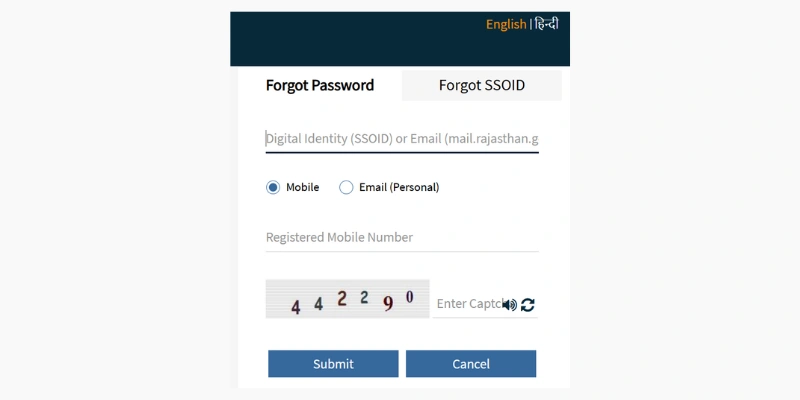
Mobile Number OTP
Enter your 10-digit mobile number linked with Jan Aadhaar to receive an instantaneous 6-digit verification code.
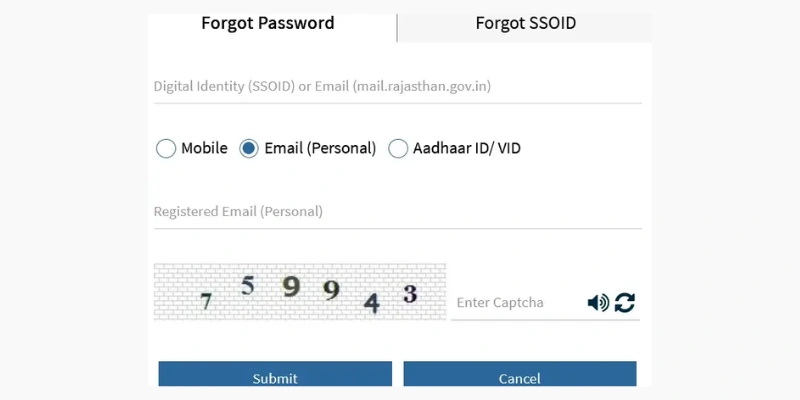
Registered Email Link
Receive an encrypted 15-minute temporary password reset hyperlink directly on your registered email address.
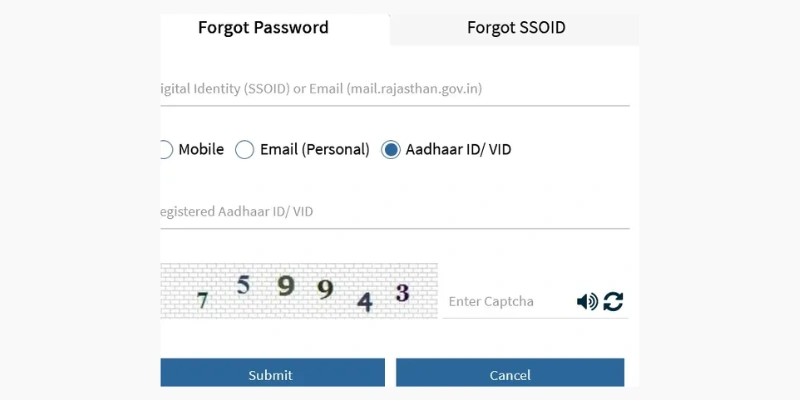
Aadhaar / Virtual ID (VID)
Direct UIDAI authentication using your 12-digit Aadhaar or 16-digit VID if you no longer retain access to past mobile numbers.
Lost or Deactivated SIM Card? The Offline e-Mitra Recovery Protocol
A frequent dilemma arises when a citizen loses access to the mobile number originally registered on their SSO profile. Because automated recovery depends on SMS one-time passwords, standard online self-service channels will fail. Follow this four-step official protocol to regain access:
Step 1: Visit Your Nearest Authorized e-Mitra Kiosk
Locate an authorized government e-Mitra center or Atal Seva Kendra in your gram panchayat or ward. Carry your original physical Jan Aadhaar Card and 12-digit UIDAI Aadhaar Card along with your new, active mobile SIM card.
Step 2: Undergo Biometric Fingerprint / Iris Authentication
The e-Mitra operator initiates a "Jan Aadhaar Citizen Data Update" transaction. You must place your finger on the biometric scanner to prove physical identity against UIDAI records. This completely bypasses the need for the old phone number.
Step 3: Update Mobile Number in the Jan Aadhaar Master Registry
The operator inputs your new mobile number and triggers an instant OTP to your new SIM to verify possession. Once confirmed, an electronic token is submitted to the block development officer (BDO) for Level-1 approval.
Step 4: Allow 24-Hour Database Sync & Reset Online Password
Once BDO approval is granted (typically 12 to 24 hours), the State Resident Data Hub automatically synchronizes your new phone number with the RajSSO authentication engine. You can now use the "I Forgot my Password" online tool or send SMS RJ SSO to 9223166166 from your new SIM card.
Recovering Accounts When Multiple Family Members Share One Phone
In millions of Rajasthan households, all family members (parents, siblings, children) are enrolled under a single Jan Aadhaar card linked to one shared mobile number. When you attempt account recovery, take care to target your specific record:
SMS Query Response for Shared Numbers
When you send RJ SSO to 9223166166 from a shared number, the NIC SMS server returns a comma-separated list of all SSO IDs linked to that phone number (e.g., "Your SSOIDs are: rahul.sharma99, priya.sharma02, ram.sharma65"). Match your name to the exact username before attempting a password reset.
Preventing Accidental Password Overwrites for Family Members
Never initiate a password reset using another family member's SSO ID. Doing so invalidates their active login session, locks their mobile app, and causes confusion during recruitment exams. Always verify the member selection radio button on the Jan Aadhaar roster screen before submitting the password change token.
Reactivating Archived and Dormant SSO Profiles (3-Year Policy)
Under Rajasthan State Cybersecurity and Data Hygiene standards, SSO accounts that register zero successful logins for 36 consecutive months (3 years) are automatically transitioned to an "Archived / Dormant" status. If your account is dormant, standard automated password resets may fail with the message "Account status inactive". Follow this reactivation protocol:
Compose Formal Support Request
Send an email to helpdesk.sso@rajasthan.gov.in from your registered email address with the subject line: "Request for SSOID Reactivation - [Your SSOID]".
Attach Verification Identity Proofs
Attach self-attested scanned copies of your Jan Aadhaar Card, 12-digit UIDAI Aadhaar Card, and an active mobile bill or declaration showing ownership of the registered phone.
Resolution Timeline: State IT engineers review reactivation tickets within 2 to 3 working business days. Once unfrozen, your complete historical profile—including your permanent OTR candidate enrollment—is fully restored without penalty.
SSO Password Hardening Guidelines & Complexity Standards
When defining a new password during the recovery process, the state authentication firewall enforces strict entropy criteria. If your proposed password fails any of these conditions, the submission button remains disabled:
Minimum 8 Characters
Must contain between 8 and 16 characters. Shorter inputs are rejected automatically by the client validator.
Uppercase & Lowercase Letters
Must include at least one English capital letter (A–Z) and at least one small letter (a–z).
At Least One Numeric Digit
Must contain at least one numeral from 0 through 9. Avoid sequential numbers like 1234.
At Least One Special Character
Must include at least one approved symbol: @, #, $, %, ^, &, or *. Do not use spaces or quotation marks.
Recommended Passphrase Strategy for High Security and Easy Recall
Instead of using random jumbles of characters that are easily forgotten (e.g., X7#mK$9q), state cybersecurity experts recommend combining two memorable words separated by a symbol and two digits (e.g., Jaipur#Fort24 or Desert$Camel98). This creates a cryptographically resilient password with high mathematical entropy while ensuring you can easily type it on smartphone keyboards without triggering lockouts.
Common Recovery Roadblocks & Official Solutions
Troubleshooting for expired reset tokens, inactive SIMs, and unreceived carrier SMS alerts.
Registered Mobile Number is Lost or Deactivated
If you no longer retain access to the phone number on file, automated OTP recovery will not work. You must visit your local authorized e-Mitra kiosk with your physical Jan Aadhaar card and Aadhaar card to update your mobile number via biometric fingerprint authentication.
SMS to 9223166166 Failed to Deliver or No Reply
Verify that your SIM card has an active SMS balance or plan (some prepaid plans block outgoing SMS without a top-up). On dual-SIM phones, ensure you sent the SMS from SIM 1 or SIM 2 matching your registered number.
Password Reset Link Has Expired
For cybersecurity reasons, the password reset token dispatched to your email address or SMS expires exactly 15 minutes after issuance. If expired, return to the recovery page and request a fresh reset link.
Aadhaar OTP Not Arriving on Mobile
UIDAI Aadhaar OTPs are sent to the mobile number registered in the central Aadhaar database (UIDAI), which may differ from your Jan Aadhaar number. Verify your registered mobile on uidai.gov.in before retrying.
Account Permanently Blocked Due to Inactivity
If an SSO ID remains unused for over 3 years, it may enter an archived state. Contact the DoIT&C Helpdesk at 0141-5153222 or email helpdesk.sso@rajasthan.gov.in with scanned proof of identity to reactivate your profile.
Government Contact Directory
Toll-free across Rajasthan (Free call)
Alt: 0141-2925554
Dial 181 for service complaints
Recovery Questions & Answers
Answers about SMS response times, SIM card replacements, token expirations, and helpline escalation.