An independent guide — not affiliated with the government
sso.rajasthan.gov.in

SSO ID Rajasthan — Login & Registration Guide

Whether you need a scholarship, a government job form, or a salary slip — one thing handles it all: your SSO ID. This guide covers how to do SSO login on sso.rajasthan.gov.in, create a new account, and recover a forgotten SSO ID or password. No jargon, no runaround.

By Kamlesh ChoudharyReviewed weekly
100+
Government services
2013
Launched by DoITC
1
Single sign-on ID
Share this guide:WhatsAppXTelegramLinkedIn

What do you need?

What do you need?Go here
Create a new SSO IDSSO ID Registration guide
Log in to SSOSSO ID Login guide
Forgot SSO IDSMS 'RJ SSO' to 9223166166
PayManager salary slipPayManager service guide
Scholarship applicationScholarships hub
Exam registration (OTR)Exams hub
SSO LoginRegistrationForgot SSO IDMerge ID

Latest Updates

View all →
Exam season

Why searches for SSO ID spike around exam season

Every time RPSC or RSMSSB opens applications — CET, LDC recruitment, or the Patwari exam — traffic to SSO login pages jumps sharply in the days before the deadline. That is not a coincidence: the Recruitment Portal sits behind the same SSO login as everything else, and One-Time Registration (OTR) has to be completed before a candidate can even see the actual exam application form.

The problem is timing. Most applicants only realise they need an SSO ID a few days before the last date, by which point any registration mistake — a mismatched name, an inactive mobile number, or a duplicate account from years ago — becomes urgent instead of a minor inconvenience.

If you want the current application windows and exam dates for CET, LDC, and Patwari in one place, the Exam Calendar keeps them in a single table, updated as RPSC and RSSB publish new dates.

SSO ID Rajasthan is a Single Sign-On account issued by the Rajasthan government's Department of IT & Communication (DoITC) at sso.rajasthan.gov.in. It gives every Rajasthan resident — students, government employees, and business owners — access to 100+ state government services using one username and password. The SSO system has been operational since 2013.

Overview

What is SSO ID Rajasthan?

SSO stands for Single Sign-On. In Rajasthan's case, it means one account — one username and password — that opens the door to over 100 government services. Scholarship forms, exam registrations, salary slips, ration card updates: all of it runs through this one SSO portal at sso.rajasthan.gov.in.

The Rajasthan government launched this Rajasthan Single Sign-On system in 2013 under the Department of Information Technology & Communication (DoITC). Before SSO existed, a citizen had to create separate logins for each department. Now, a student in Barmer and a government teacher in Jaipur both use the same SSO ID to access completely different services — that is the whole point of a single sign-on.

If you live in Rajasthan and interact with the government online even once a year, you need an SSO ID. The three groups who use it most are everyday citizens (with Aadhaar or Jan Aadhaar), government employees (for PayManager, RajKaj, and SIPF), and business owners (for GST, BPAS approvals, and labour compliance).

Why Your SSO ID Is the Most Useful Thing the Rajasthan Government Ever Made

Most government websites are painful. You already know this. Rajasthan's SSO portal is genuinely different — not perfect, but different.

Before 2013, filling a scholarship form meant visiting the education department in person. Checking your SIPF balance meant calling someone. Every department had its own password, its own login page, and its own way of losing your data.

Now one SSO ID handles all of it. A Class 12 student in Jhunjhunu can register on the SSO portal, apply for a post-matric scholarship, check the e-Mitra status of that application, and download an admit card — without leaving their chair. That is not nothing.

Is the portal slow sometimes? Yes. Does the OTP occasionally take five minutes to arrive? Also yes. But the core idea — that a single verified identity connects you to every government service — is solid, and Rajasthan has executed it better than most Indian states. If you have not created your SSO ID yet, that is the first thing to fix.

  • Access e-Mitra services online
  • Apply for Rajasthan government jobs
  • Register for RPSC and RSMSSB examinations
  • Use Jan Aadhaar related services
  • Access PayManager and RajKaj portals
  • Apply for scholarships and welfare schemes
  • Download admit cards and recruitment notifications
  • Access various departmental services from one dashboard
Who can use

Who Can Use SSO ID Rajasthan?

Citizens

Residents of Rajasthan can create an account using Jan Aadhaar, Aadhaar, or other supported methods to access public services and welfare schemes.

Government Employees

Government staff can use SSO credentials to access official portals such as PayManager, RajKaj, departmental systems, and employee-related services.

Businesses and Industries

Business users can access services related to registrations, approvals, compliance requirements, and other government interactions.

Services

Major Services Available Through SSO

Your single SSO login opens a dashboard of tiles grouped loosely by who needs them. Here is what one account actually reaches.

Students & Job Seekers

  • Recruitment Portal (OTR)

    RPSC and RSMSSB vacancies and One-Time Registration applications.

  • Scholarship Portals

    SJE schemes for SC, ST, OBC, EWS, and minority students.

  • e-Learning & e-Library

    Digital study material and reference resources.

  • Academic Bank of Credits

    Sync your degrees and credits with your ABC ID.

General Citizens

  • e-Mitra

    Hundreds of services from bill payments to certificate issuance.

  • Jan Aadhaar

    Manage family records and check scheme eligibility.

  • Chiranjeevi / MAAY

    Enrol in state health-insurance schemes.

  • Raj eVault

    Digital locker for storing verified documents.

Government Employees

  • RajKaj

    Leave applications, ACRs, and inter-departmental work.

  • SIPF

    Provident fund balances, insurance, and loan applications.

  • PayManager

    Salary slips and GA-55 forms.

  • Attendance MIS & e-Gras

    Office attendance records and government receipts.

Business Owners

  • State GST Portal

    File returns and manage GST compliance.

  • BPAS

    Building plan approvals for construction projects.

  • Udyog Aadhaar / BRN

    Business registration and industrial licensing.

  • Labour Compliance

    Labour department tools and renewals.

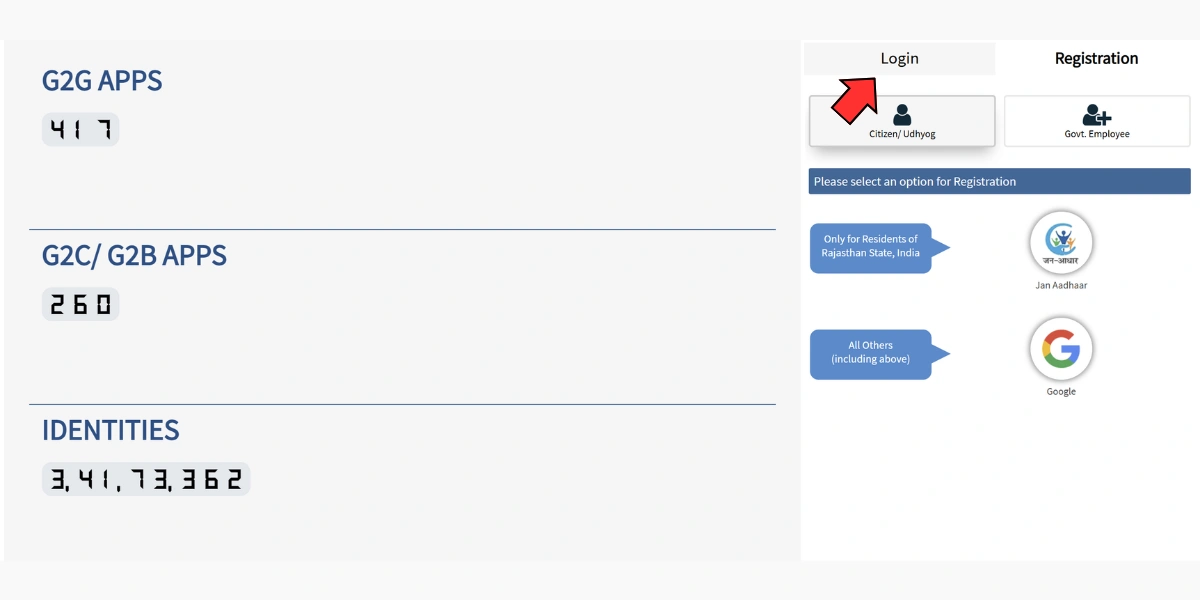
Login

How to do SSO ID Login

  1. 1Open sso.rajasthan.gov.in in Chrome or Firefox — older browsers sometimes break the CAPTCHA.
  2. 2Enter your SSO ID in the username field — this is the username you chose at registration, not your Aadhaar or phone number.
  3. 3Enter your password, then type the CAPTCHA exactly as shown (click refresh if it is hard to read).
  4. 4Click Login to open your RajSSO dashboard. Three failed password attempts lock the account for 30 minutes, so use Forgot Password instead of guessing.
Eligibility

Who Actually Needs an SSO ID in Rajasthan?

User typeWhy they need SSO ID
School / College StudentsMukhyamantri Scholarship, Palanhar Yojana, SJE scholarships
Job SeekersRSMSSB exam forms, RPSC applications, Rozgar Mela registrations
FarmersPM Kisan status checks, e-Mitra services
General CitizensBhamashah card, ration card updates, birth/death certificates
Teachers & Government StaffSIPF pension portal, salary slip access
Get ready

Documents You Need Before You Start Registration

  • Aadhaar Card — the most reliable option for students.
  • Jan Aadhaar Card (formerly Bhamashah) — preferred for family-linked schemes.
  • Mobile number linked to Aadhaar — required for OTP verification.
  • Active email address — needed to set your password and for future recovery.
  • A recent photograph (JPEG, under 100KB) — only for some service applications, not for SSO registration itself.
Registration

How to Create Your SSO ID — Registration Options

Option 1: Register via Jan Aadhaar (recommended for families)

  1. 1Click Jan Aadhaar on the registration screen.
  2. 2Enter your 10-digit Jan Aadhaar ID (the main number on the card, not a sub-member number).
  3. 3An OTP is sent to the family head's registered mobile number.
  4. 4Enter the OTP and select your name from the family list.
  5. 5Set a username and password — your username becomes your SSO ID, so note it down.

Common mistake: people enter the individual member ID instead of the family's 10-digit Jan Aadhaar ID.

Option 2: Register via Aadhaar (recommended for individual students)

  1. 1Click Aadhaar Card on the registration page.
  2. 2Enter your 12-digit Aadhaar number.
  3. 3Choose OTP delivery by mobile or email (use mobile if your number is seeded).
  4. 4Enter the OTP within 10 minutes.
  5. 5Choose a unique username — this becomes your permanent SSO ID.
  6. 6Set a strong password (at least 8 characters with a number and a special character), then click Register.

Option 3: Register via Google or Facebook (quickest, but limited)

  1. 1Link your Google or Facebook account to create an SSO ID in under two minutes.
  2. 2This creates a basic account only.

Several services, including the SJE Scholarship, require an Aadhaar-verified SSO ID. Students should avoid this option.

Recovery

Forgot Your SSO ID or Password? Recovery Scenarios

You remember your SSO ID but forgot your password

  1. 1Click Forgot Password below the login box.
  2. 2Enter your SSO ID (username).
  3. 3Choose a recovery method: mobile OTP, email OTP, or security question.
  4. 4Enter the OTP or answer and set a new password, then log in immediately.

You forgot your SSO ID entirely

  1. 1Click Forgot Username on the login page.
  2. 2Enter the mobile number or email used during registration.
  3. 3Enter the OTP sent to verify ownership.
  4. 4Your SSO ID is shown on screen and sent to your registered mobile/email.

Your account is locked

  1. 1After three failed login attempts the account locks for 30 minutes.
  2. 2Wait out the timer, then use Forgot Password to reset instead of guessing again.

Your OTP is not arriving

  1. 1Confirm the mobile number is the one registered with Aadhaar/Jan Aadhaar.
  2. 2Wait 5 minutes for network congestion to clear, then retry.
  3. 3Try the email OTP option instead of SMS.
  4. 4Clear the browser cache and retry on a fresh tab; if it still fails, visit a nearby e-Mitra kiosk with your Aadhaar.
Recruitment

One-Time Registration (OTR) for Government Recruitment

If you plan to apply for Rajasthan government jobs, the Recruitment Portal's One-Time Registration (OTR) system is the gateway you will use repeatedly through the year.

The idea is simple: pay a single registration fee once, then apply to multiple recruitment drives — CET, LDC, Patwari, and other RPSC or RSSB exams — without paying a separate fee for each one during that registration cycle.

  1. 1Log in to your SSO account and open the Recruitment Portal.
  2. 2Click "One Time Registration" on the portal dashboard.
  3. 3Choose Aadhaar or Jan Aadhaar verification (recommended) — it auto-fills your name, father's name, date of birth, and gender from official records.
  4. 4Cross-check every auto-filled detail against your Class 10 marksheet; later corrections usually carry a separate fee (commonly cited around ₹300).
  5. 5Link your Academic Bank of Credits (ABC ID), if you have one, to sync your educational records digitally.

OTR fee structure

CategoryTypical fee
General / OBC (Creamy Layer) / candidates from other states₹600
SC / ST / OBC (Non-Creamy Layer) / EWS / PwD (Rajasthan domicile)₹400

Out-of-state candidates are generally treated as "General" for fee purposes regardless of their home-state category. Exact fees are set by RPSC and RSSB and can change, so confirm the current figure on the official recruitment notification before paying. Many high-security drives now require face authentication, so keep a working camera and a clear, well-lit space ready.

Account

How to Merge Duplicate SSO IDs

A common situation: someone registers once through Google for convenience, then again through Jan Aadhaar when applying for a scholarship — ending up with two SSO IDs. Since an Aadhaar number can link to only one account, this duplication quietly blocks scholarship and recruitment services tied to that Aadhaar.

The "Deactivate Account" option does not delete anything outright — it opens a merge flow that safely transfers your data into a single primary account.

  1. 1Log in to the account you want to close — typically the newer or less-used citizen ID.
  2. 2Open Edit Profile using the pencil icon at the top of your dashboard.
  3. 3Click "Deactivate Account," then choose the Merge option from the dialog.
  4. 4Verify your identity with an OTP, then enter the SSO ID of the account you want to keep as primary.
  5. 5Confirm the merge. Your data transfers to the primary account and the duplicate is permanently closed.

Double-check at step one that you are logged into the account you intend to close, not the one you intend to keep — this single mix-up is the most common merge mistake.

Jan Aadhaar

Updating Jan Aadhaar Details Through SSO

Many welfare schemes — including Chiranjeevi health insurance and various scholarship schemes — require an up-to-date Jan Aadhaar record. Updates are free and handled in two phases.

Phase 1 — E-KYC (mandatory first step)

  • Every family member above five years of age must complete E-KYC before any other detail can be edited.
  • Log in, open the Jan Aadhaar section, and select the E-KYC option.
  • Authenticate each member with an Aadhaar OTP.

Phase 2 — Editing specific details

  • Once E-KYC is complete, update income, bank account details, mobile number, or address.
  • Each type of update needs a specific supporting document (see the table below).
  • After uploading, the request goes through a two-level verification that typically takes one to two weeks.

Documents required by update type

Update typeDocument required
IncomeSelf-declaration or income certificate
Bank detailsPassbook copy or a cancelled cheque
New family memberBirth certificate and Aadhaar card
Marriage recordMarriage certificate
Land / farmer detailsJamabandi (land record)

Track progress under "Enrolment Status" in your Jan Aadhaar dashboard — a green checkmark means approved, while a red cross means the request was rejected (usually an unclear scan) and needs to be re-submitted with a better copy.

Help by city

Troubleshooting

Common SSO Login Errors and Their Fixes

Error messageWhat it meansFix
Invalid Username or PasswordCredentials mismatchUse Forgot Password to reset
Account Locked3+ failed attemptsWait 30 minutes, then reset password
OTP Not ReceivedWrong mobile number or network issueTry email OTP or retry after 5 minutes
Name MismatchName in SSO does not match AadhaarUpdate profile or use the Aadhaar-matching name
Session TimeoutInactivity on the portalLog in again; save your work frequently
CAPTCHA ErrorMisread charactersClick the refresh icon to get a new CAPTCHA

Should You Use the SSO Mobile App?

The "SSO Rajasthan" app is available on Android and iOS and covers most desktop services, handy for quick OTP access and dashboard browsing. However, for filling scholarship forms, exam applications, or uploading documents, use the desktop browser — the mobile upload interface is known to time out on slow connections.

Checklist

Before You Register: Quick Checklist

  • Have your Aadhaar or Jan Aadhaar card with you.
  • Your Aadhaar-linked mobile has signal and can receive SMS.
  • You are on a stable internet connection.
  • You have chosen a unique, memorable username (example: rahul.sharma.2006).
  • Your password has at least one letter, one number, and one special character.
  • You have written down your SSO ID and password somewhere safe.
  • You are using Chrome or Firefox (older browsers have compatibility issues).
At a glance

SSO Rajasthan at a Glance

Official Portalsso.rajasthan.gov.in
Services Available100+ government services
Registration MethodsJan Aadhaar, Aadhaar, Google, Facebook
Account Lock Duration30 minutes after 3 failed attempts
Support

Official Helpline and Support Contacts

ServiceContact
General Helpline0141-5153222 / 0141-2925554 / 0141-5123717
Jan Aadhaar Toll-Free1800-180-6127
Grievance / Rajasthan Sampark181
Support HoursMonday–Friday, 10:00 AM – 6:00 PM

Helpline numbers and support hours are occasionally revised, so check the official sso.rajasthan.gov.in contact page if a number listed here does not connect.

About This Guide

RajSSO Guide is an independent, free resource for Rajasthan residents who need straight answers about the SSO portal. It is not affiliated with the Government of Rajasthan or any government department.

Every page is researched from primary government sources and updated whenever the SSO portal changes. The last full review of this page was 8 July 2026.

Sources & Official References

This guide is cross-checked against the following official Rajasthan government sources. Last verified: 8 July 2026.

  1. sso.rajasthan.gov.in Official Rajasthan SSO portal (DoITC, GoR)
  2. sje.rajasthan.gov.in Social Justice & Empowerment Department (scholarships)
  3. paymanager.rajasthan.gov.in Finance Department — PayManager salary portal
  4. janaadhaar.rajasthan.gov.in Jan Aadhaar official portal
  5. hte.rajasthan.gov.in Higher & Technical Education Department
  6. rpsc.rajasthan.gov.in Rajasthan Public Service Commission (RPSC)
  7. rsmssb.rajasthan.gov.in Rajasthan Staff Selection Board (RSMSSB)
  8. sipf.rajasthan.gov.in State Insurance & Provident Fund (SIPF)
  9. emitra.rajasthan.gov.in e-Mitra citizen services portal

Written and maintained by Kamlesh Choudharyfull-stack developer and web publisher based in Jaipur, Rajasthan.

GitHubPortfolio

Found outdated information or an error? Report it and it gets fixed quickly. Contact our editorial team.

Frequently Asked Questions

What is SSO ID Rajasthan?
SSO ID Rajasthan is a Single Sign-On account issued by the Rajasthan government through sso.rajasthan.gov.in. It gives you access to 100+ government services — scholarships, exams, salary slips, health insurance, and more — using one username and password.
What is SSO ID used for?
Your SSO ID is used to log in to the Rajasthan SSO portal and access services like RPSC exam applications, post-matric scholarships (SJE), PayManager salary slips, e-Mitra, Jan Aadhaar, Chiranjeevi health insurance, and dozens of other government portals.
How do I do SSO ID login?
Go to sso.rajasthan.gov.in, enter your SSO ID (username) and password, type the CAPTCHA, and click Login. If you have forgotten your password, use the 'Forgot Password' link on the same page.
How do I register for SSO ID?
Click 'Registration' on the SSO portal. Choose your type: Jan Aadhaar (for families), Aadhaar (for individuals), or Google/Facebook (limited access). Enter the required details, verify with OTP, and set a username and password. Your username becomes your permanent SSO ID.
How do I recover a forgotten SSO ID?
The fastest way is to send the SMS 'RJ SSO' to 9223166166 from your registered mobile number — your SSO ID is returned by SMS within seconds. Online, click 'Forgot Username' on the SSO login page, enter the mobile number or email registered on your account, verify with OTP, and your SSO ID will appear on screen and be sent to your registered contact.
Is SSO ID registration free?
Yes. Creating an SSO ID on sso.rajasthan.gov.in is completely free. Some services accessed through SSO (like OTR exam registration) have their own fees set by the respective departments.
Can I have two SSO IDs?
Technically you can create two accounts, but you shouldn't. One Aadhaar number and one phone number can link to only one SSO ID. If you have two accounts, use the merge option in your profile to combine them into one.
What documents are needed for SSO ID registration?
You need either an Aadhaar card or a Jan Aadhaar card, a mobile number linked to that document (for OTP), and an email address. A recent photograph is not required for registration itself.
Who runs the SSO Rajasthan portal?
The SSO portal is maintained by the Department of Information Technology & Communication (DoITC), Government of Rajasthan. It has been operational since 2013.
What is the Rajasthan Single Sign-On portal address?
The official Rajasthan Single Sign-On portal address is sso.rajasthan.gov.in. This is the only legitimate login URL — avoid any third-party sites that ask for your SSO credentials.
Can someone living outside Rajasthan create an SSO ID?
Yes, mainly for exam purposes. Out-of-state candidates can register and complete OTR for RPSC or RSSB exams open to all-India applicants, but they are generally treated as the General fee category regardless of their home state's reservation category.
Is my old Bhamashah-based SSO ID still valid in 2026?
Bhamashah has been folded into Jan Aadhaar, but SSO accounts originally created through Bhamashah generally continue to work. If login fails on an old account, first confirm the linked mobile number is still active rather than assuming the account expired.
What happens if the name on my SSO ID does not match my Aadhaar?
Most day-to-day use is unaffected, but it becomes a problem during OTR for recruitment exams, where auto-filled details are checked against your Class 10 marksheet. Correcting a mismatch after submission usually carries a separate fee, so fix it in your profile before you apply.
Do I need a computer, or can I register entirely on a phone?
Registration works fine on mobile. Document uploads for scholarship forms or exam applications are the part that struggles on mobile browsers, particularly on slower connections, so those steps are better done on a desktop or laptop where possible.
Is my SSO ID the same thing as my Jan Aadhaar number?
No. Jan Aadhaar is a 10-digit family identity number used as one method to register. Your SSO ID is the separate username you choose during that registration, and it is this username — not your Jan Aadhaar number — that you use to log in afterward.
If I move to a different city within Rajasthan, does my SSO ID change?
No. The SSO ID is tied to your identity, not your address. Moving cities does not require a new account, though updating your address under Jan Aadhaar may still be worth doing if a welfare scheme you use checks residence details.

Safety Tips for SSO Users

  • 🔒Always check the URL says sso.rajasthan.gov.in before entering credentials — then bookmark it.
  • 🔒Never share your SSO password with anyone, including e-Mitra operators or 'helpline' numbers that call you.
  • 🔒Use a strong password: at least eight characters with one number and one special character.
  • 🔒Keep your registered mobile number active; if your SIM changes, update it at e-Mitra before you lose access.
  • 🔒Log out after using SSO on shared or public computers.
  • 🔒If someone calls asking for your OTP, hang up — no real SSO support team ever asks for an OTP.
  • 🔒Be cautious of unofficial websites that claim to 'recover' or 'fix' your SSO ID for a fee; official recovery is always free.
  • 🔒Update your Jan Aadhaar and contact details promptly when they change, rather than waiting until you urgently need them.

Have a question or suggestion?

Reach our editorial team or report incorrect information on any page.

Contact Us
Share this guide:WhatsAppXTelegramLinkedIn

This is an independent guide. The official portal is sso.rajasthan.gov.in. sso.rajasthan.gov.in